Salesforce+
Streaming Video Platform Product System
At Instrument, I rebuilt the design system for Salesforce+, their streaming video platform for Dreamforce events. I worked directly with the product design team on new features, collaborated with the creative director on system guidelines, and served as the touchpoint for system considerations as other teams added features. The work included two rounds of optimization—first restoring broken components, then leveraging Figma's new variables and variant properties to dramatically simplify the library.
The Problem
The Salesforce+ design system was broken. Components didn't work correctly, designers avoided using the library, and new feature requests kept piling up. The card component alone had become unmanageable—dozens of variants for every toggle permutation. The system needed to be rebuilt from the ground up while still supporting active feature development.
The Results
The rebuilt system cut breakpoint design time by over 80%—what used to take designers a couple of days now took minutes. By using Figma's boolean properties, I collapsed the card component from dozens of variants down to a manageable set. The variables I built for grids and colors gave the dev team detailed specs they hadn't had before. The system went from something designers avoided to something they actually used.
Salesforce+ is a dynamic platform with a diverse range of content and features, catering to a global audience. The platform's design system was not keeping pace with its rapid growth and the evolving needs of its users. Designers and developers faced difficulties with an outdated library that often led to broken designs and reluctance to utilize the system. The introduction of new features such as video tagging, player settings, and event filtering further compounded the complexity. The task at hand was not only to repair and optimize the existing system but also to future-proof the design process, ensuring scalability and adaptability to new requirements.
In my role for Salesforce+, the primary objectives were to rebuild and optimize the design system library, enhance usability, ensure brand consistency, and streamline the design process for efficiency and scalability. This involved a meticulous approach to redefining design elements, from grid systems and color palettes to component structures and iconography, all while maintaining alignment with Salesforce's brand guidelines and business goals.
Grid optimization with variables
With the introduction of variables in Figma, I saw an opportunity to simplify the process of creating breakpoints for all screen designs. Prior to creating variables for grid columns, designing for various breakpoints could sometimes take designers a couple of days.
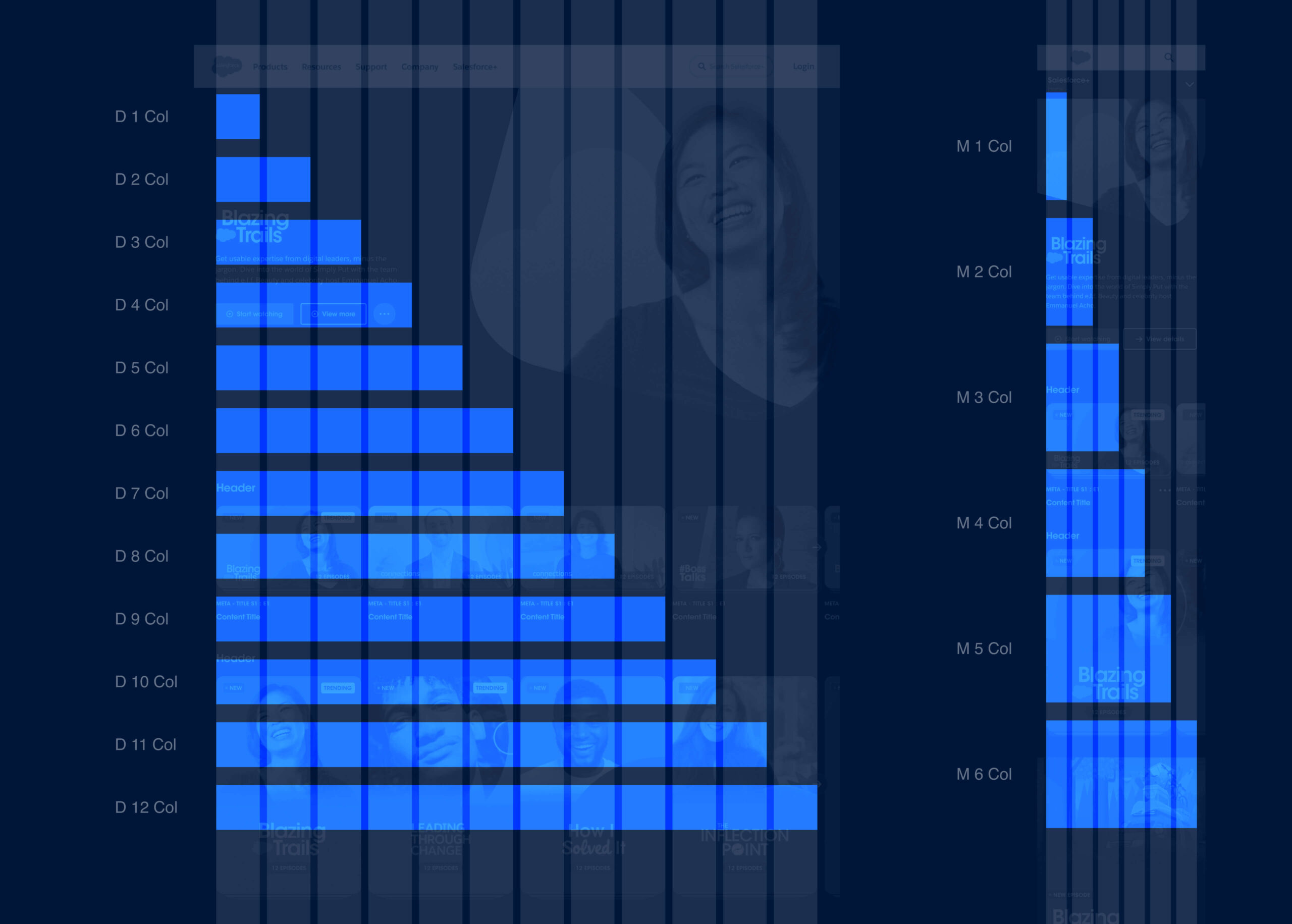
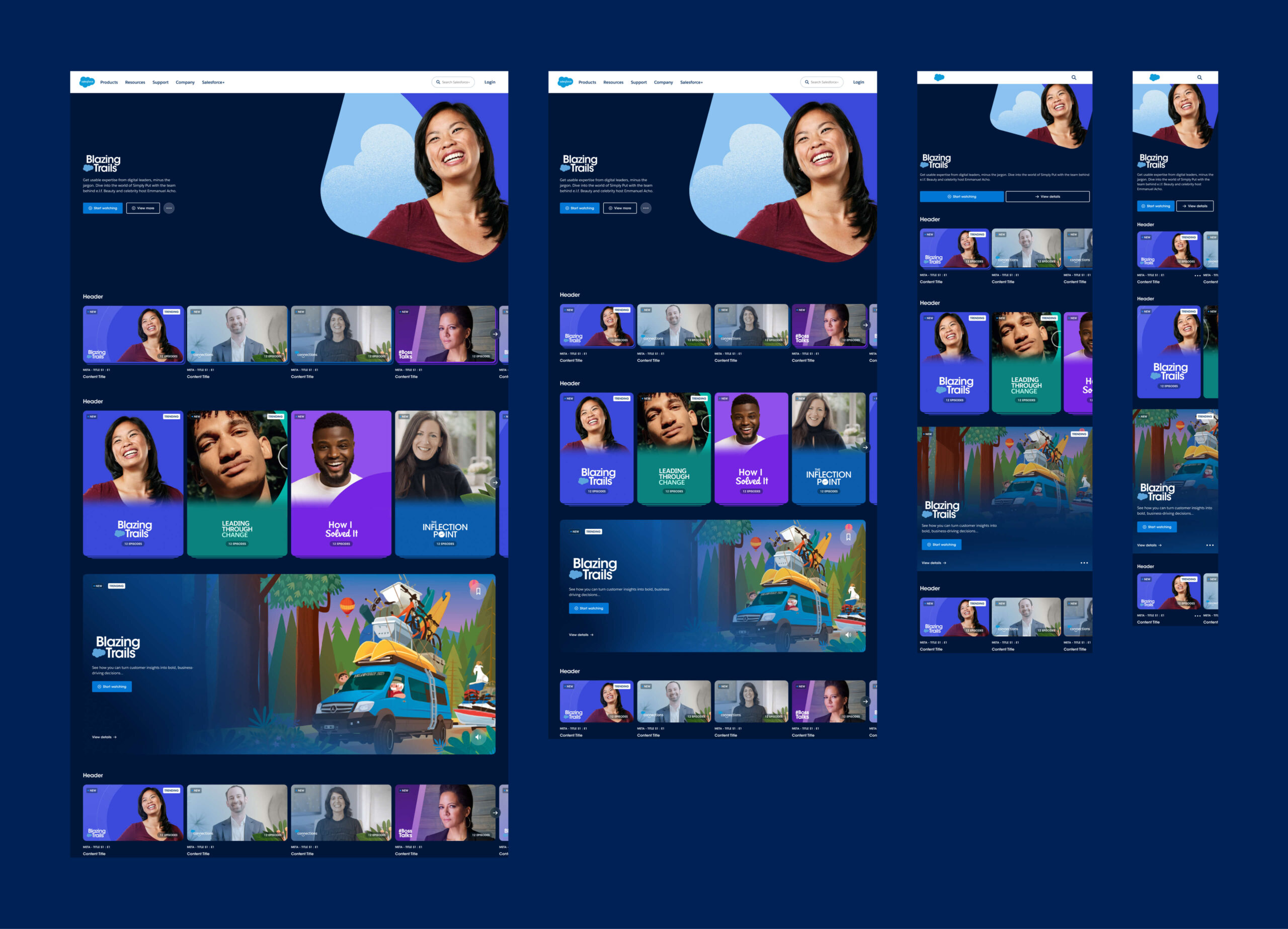
In the variable database, I captured the screen width, margins, gutter, and the width of each column span per breakpoint. This allowed designers to assign column span variables to the width of any design element or component within a design.
With variables plugged into the components on a page, all designers had to do when a certain breakpoint was needed was to duplicate the design and then select the breakpoint from the variable dropdown in Figma. This optimization reduced hours of work to just minutes.
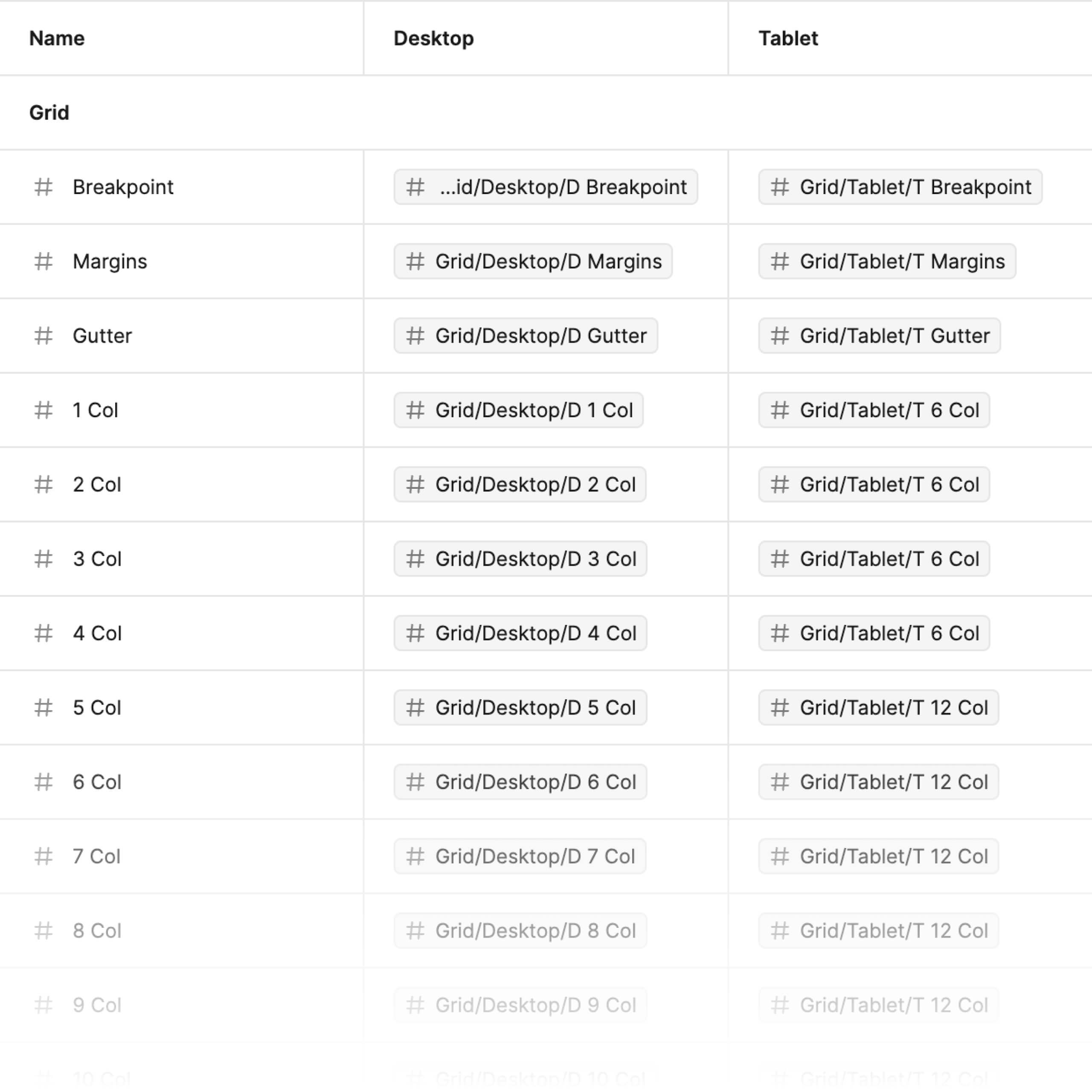
Pictured at left is the variable database for grids, specifically the breakpoint tokens. Primitive variables are assigned to breakpoint modes to facilitate changes to an entire design with just a dropdown option. This optimization also provided the development team at Salesforce with detailed grid and breakpoint information, increasing efficiency and parity between design and implementation.
Before creating grid variables, I consulted with the development department to determine the specifications they typically needed for breakpoints and the grid.
Color optimization with variables
The color palette for Salesforce+ is two-dimensional, with one axis being hue and the other being tone. As a designer, assigning the right color to the right element presented potential guesswork. With variables, I saw an opportunity to reduce the complexity of our current color styles and make them easier to parse and select.
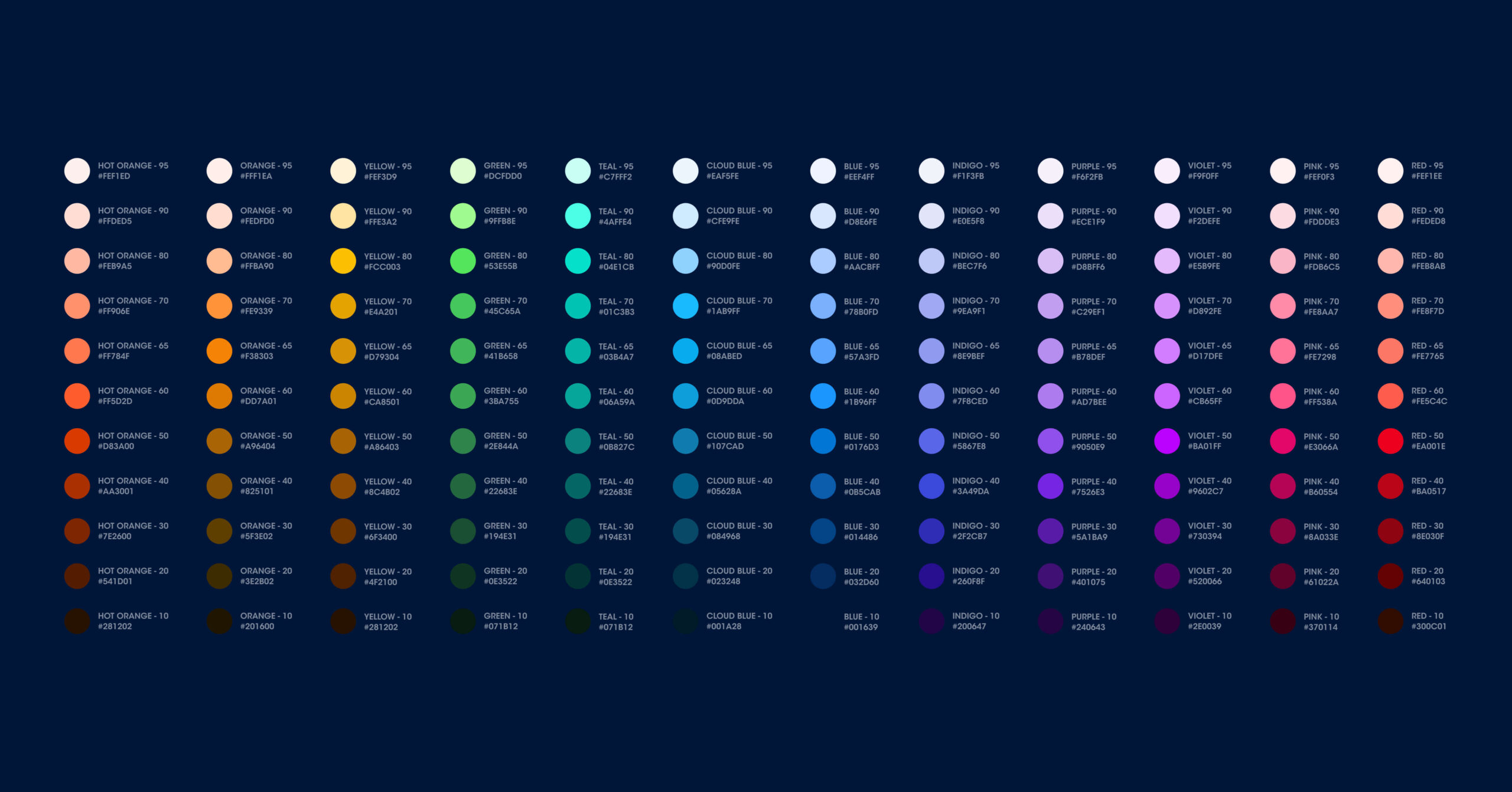
I discovered that on components designers were selecting colors for, only one tone for each hue was being used. This allowed me to tokenize the colors, removing the guesswork of which tone was the right choice per hue.
I worked with the creative director to verify the tokenization was within existing brand guidelines, and to help me fill in the blanks where specifications were missing.
The Salesforce+ product was mostly dark themed but occasionally had inverted UI surfaces like modals or copy-dense pages like the terms of service page. I tokenized a light and dark theme to make it easier for designers change the colors of UI depending on theme context.
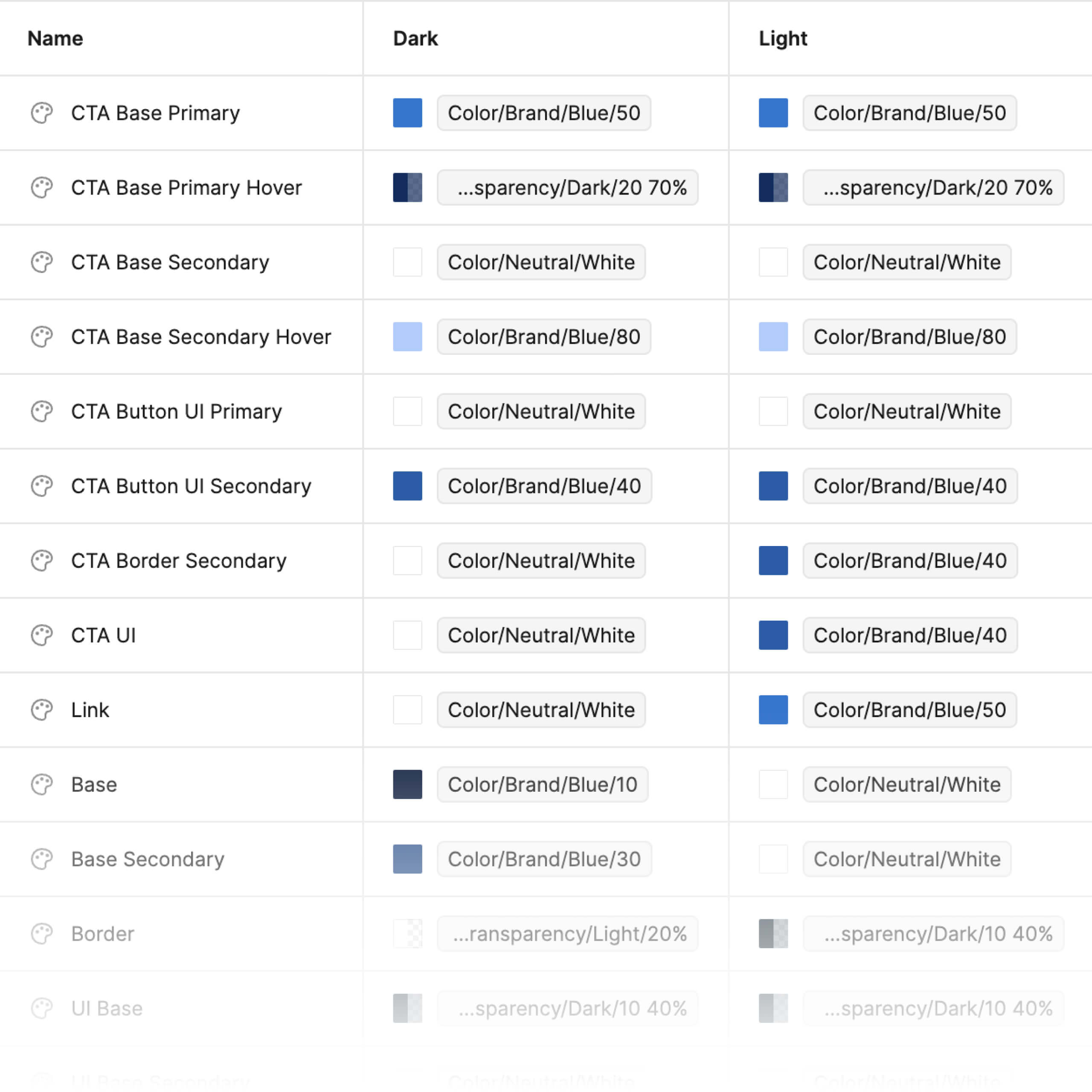
Pictured at left is the variable database for colors, specifically UI tokens. Primitive variables are assigned to theme modes to facilitate changing design element color themes via dropdown. This optimization also gave the development team at Salesforce detailed color specifications.
Documentation
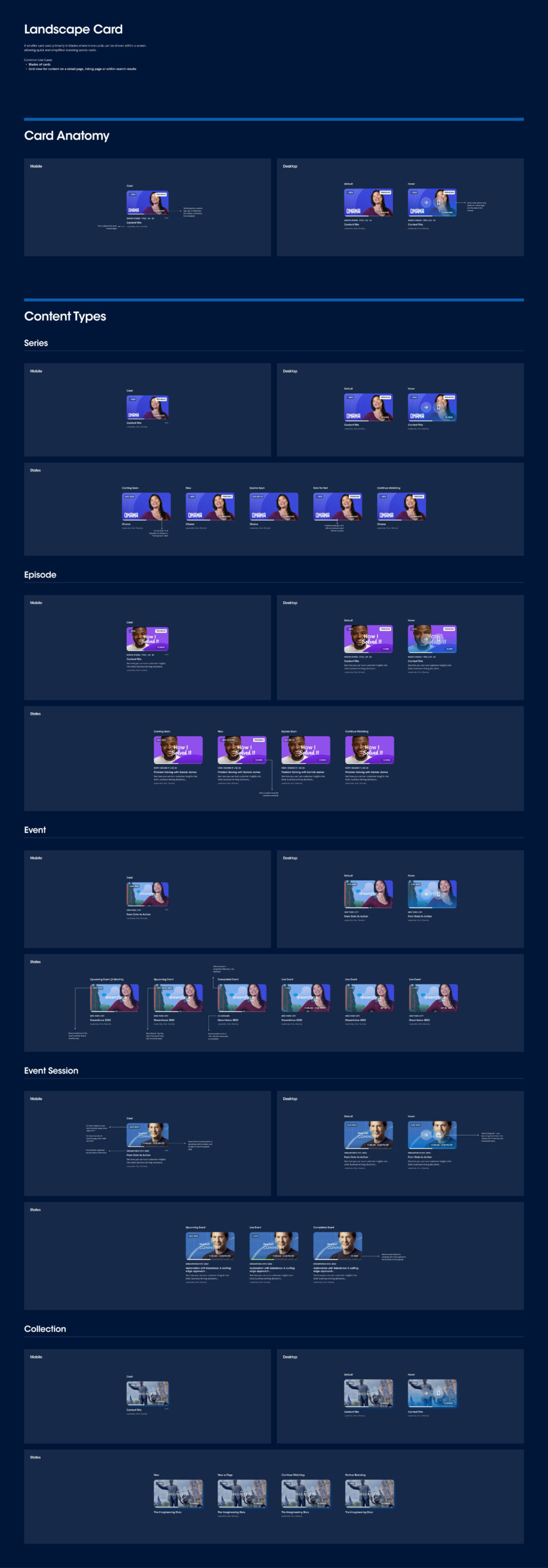
By optimizing the grid and colors using variables, we were also able to optimize the documentation. This allowed us to focus on representing component states, their logic, and usage guidelines for the development teams.
I worked closely with the creative director to refine state designs, spot-check the component designs with all states exploded against brand guidelines and product vision, and ensure guidelines followed the existing structure and process at Instrument. I also worked closely with the junior designer on the team, delegating guideline production work and providing feedback.
Before Figma's new variant properties
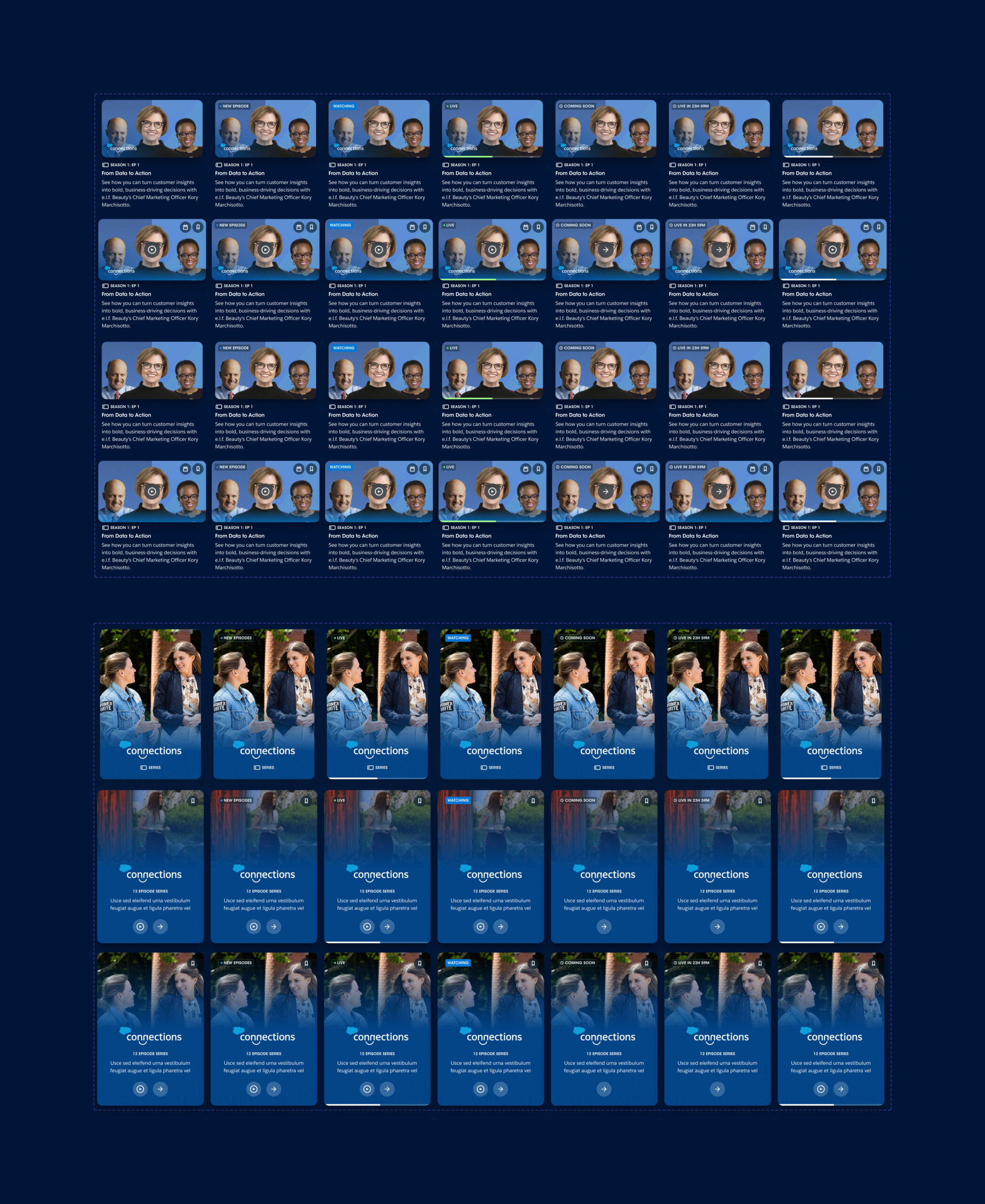
The component that bore the brunt of the feature requests was the card component. As a result, it was the most broken of all the components. Pictured below, you can see the card component before Figma introduced variant properties.
Some features that we had to design included the ability to hide a show logo depending on the product context, indicating whether a video was live or not, indicating if a video was coming soon, or if it was trending, or if a user had already watched it, etc. As you can see below, managing the variant population was becoming challenging.
After Figma's new variant properties
Most of the features in the card component were elements that required visibility toggling. With the boolean property, the need for unique variants per toggle permutation was eliminated. This not only resulted in significantly fewer variants, but also allowed us to combine the different card components into one. There were cards for individual videos, events, series, and full-width feature cards. We could also combine the mobile variants. This made managing the card component significantly easier.

The instance property allowed us to organize logos and thumbnails into element galleries that were now easy to access as variant drop downs. Text properties allowed us to surface nested text fields, making everything editable from the right column.
Pictured at left is a demo of the many different variant properties that could be adjusted for the optimized card component. Things like breakpoint, logo visibility, tag visibility, collection visibility, copy visibility etc. Pictured below is a demo of the ability to change card type.
The System
I took every opportunity to combine duplicitous components and remove superfluous ones. It was my goal to create a fully optimized, easy to maintain, lean, and deeply branded system.
The system was structured using atomic design methodology. Styles were organized at the 00 level, components at the 01 level, and elements at the 02 level. Library items were named with this numeric prefix for high-level organization.
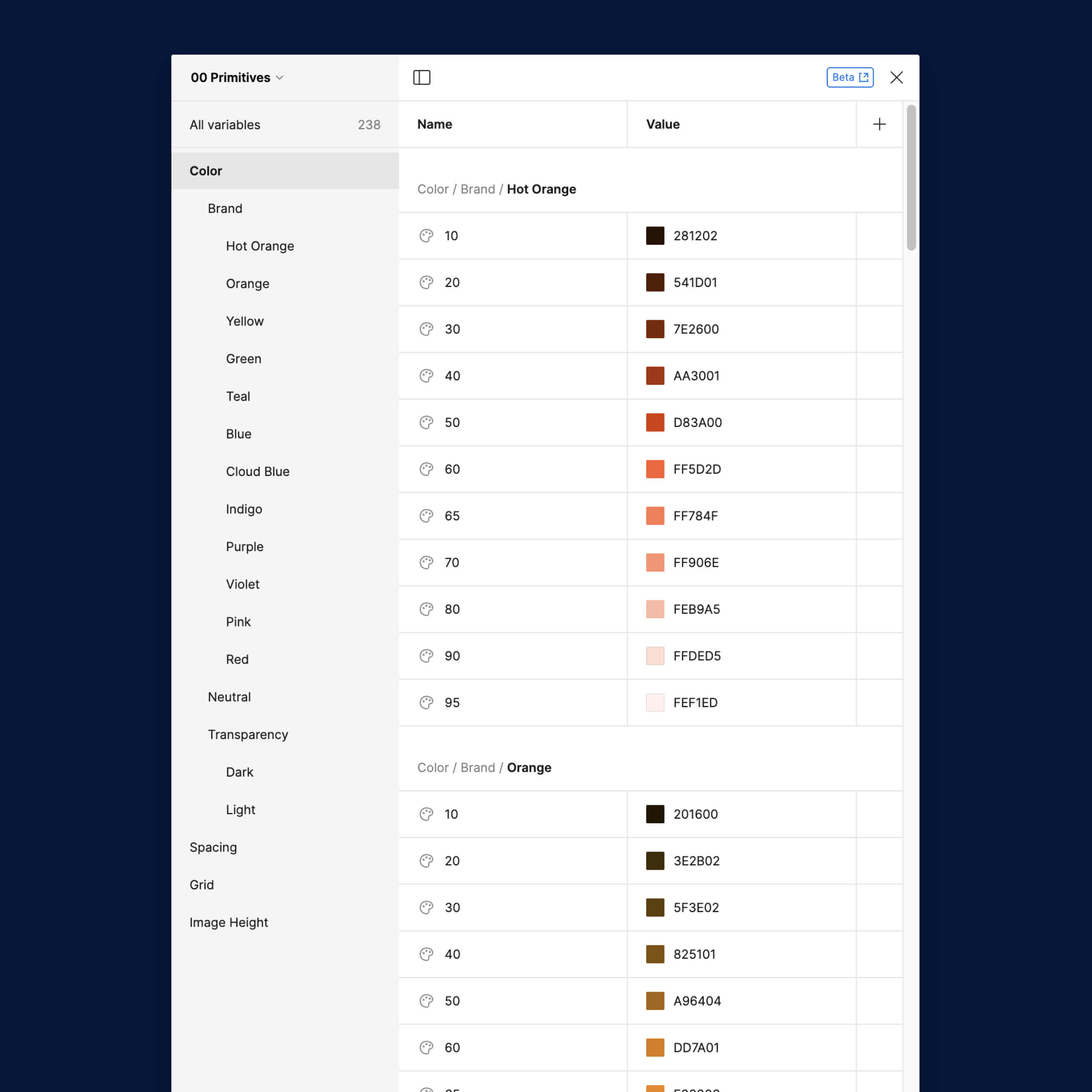
Styles from the existing library were translated into primitive variables that could be tokenized (pictured at left). I also cleaned up and documented the type ramp for dev teams.
The Salesforce+ streaming video product was robust with a wide array of content objects (pictured below). These objects needed to be designed in a way that could anticipate new features. It was essential for me to find the core patterns in the content and formalize them at the system's foundation.
Elements
Much of the library's scalability is due to the lean nature of the systems foundation, the elements, the pieces that make up the larger components. Things like copy blocks, navigation, buttons, and avatar lockups, all consist of a common nested element across all the top-level components.
I scoured the existing design materials for show logos, thumbnails, avatar photos, illustrations, and graphics to optimize and create centralized galleries for easy instantiation. I did a fair amount of iconography work, creating missing icons using the existing style.
Updating the library non-destructively
To empower the team to continue updating the library, I created a workflow for archiving old components. Essentially, when an existing component needs an update, you duplicate it, move the original to an 'Archive' page, and rename it with the date appended. The copy on the component's page can then be updated and published with changes, and it will appear in the expected asset tree. The archived component still exists and therefore won't break designs using it when the library updates are accepted. Designs can then be manually updated where desired with the new component, non-destructively.
The design team I worked with at Instrument was extremely talented and intelligent. I worked diligently alongside them, exploring new features and providing feedback on designing for a system, as Figma's component workflow was relatively new to them.
I worked closely with the UX lead throughout both rounds of optimization and building to uncover usability opportunities, vet design decisions, and component states. I collaborated closely with the lead strategist on new features to create scalable solutions. This project was challenging and dynamic. I'm extremely proud of the team I worked with to create such a simple system for such a complex product.
Process
Round 1 onboarding & research
The client needed us to change the video cards to be able to toggle series logo visibility, add additional states to the status tag, and have a visual affordance to represent if a video was live. They needed us to add language settings to the video player. They also needed UX improvements around filtering and navigating the event schedule for logged-in users. Taking a look at the existing product and Figma library, I saw opportunities to expedite this work and improve the library from a functionality and workflow perspective.
- Project briefing Met with the executive producer, senior designer, and creative director to be introduced to the Salesforce+ product. Learned about required new features for video cards, and the video player.
- Existing product audit Spent a day deep diving into the existing streaming product, the system library, the brand styleguide. Gathered questions and began taking note of issues particularly around the broken system library.
- Stakeholder interviews Met with the producer and creative director to flag questions and propose library optimization solution. Reviewed project timeline and came up with initial roadmap.
Round 1 exploration & execution
With a rough project roadmap in place, I delegated some explorations to the senior designer and began work on system optimizations.
- Delegating work Met with the senior designer and was onboarded to their historical work on the project. Delegated features to explore and onboarded them to project roadmap. Coordinated workflow of translating design explorations into system improvements and determined optimization dependencies of particular components/features.
- System optimization checklist Created an Airtable capturing feature requests and mapping them to components, elements, and their anticipated optimizations. Determined the need for new elements, and components, and captured existing ones effected by the requests/optimizations.
- Editing system library Created master components as an element to make managing large populations of variants manageable. Created new card and video player components, and their dependent elements. Optimized page navigation elements in anticipation of UX improvements to the events schedule.
- Design review Reviewed senior designer work with UX lead on event schedule and card feed improvements. Gave feedback recommending the use of some existing elements and components. Consulted UX lead on system improvements to capture feedback.
- Wider system optimization With two of the most complex components and their dependent elements rebuilt, I took the initiative to optimize and rebuild the rest of the library components: buttons, modals, heroes, icons, etc.
Round 1 implementation & documentation
Familiarized myself with the dev team and their process around system implementation. Began onboarding the wider organization to system improvements to facilitate stress testing. Initialized new system guidelines.
- Developer onboarding Met with the dev team to onboard into the implementation process of the system. Reviewed changes and captured specifications they would need.
- Stress testing Published new components to the library and onboarded relevant teams to the changes. Created Slack channels to capture feedback on new components. Made changes asynchronously.
- Initial guidelines Created a separate Figma file to stage an improved documentation solution. Began documenting new components at a high-level.
- Org support I sat in on other projects and gave system considered advice and feedback around new features. I also offered design collaboration and system support where needed.
Round 2 onboarding & research
The client had a multi-faceted tagging system they wanted to add to all card types across the product which challenged the current system structure. Figma also had just added variant properties which presented the perfect excuse for us to apply a second round of optimization to the system library.
- Project briefing Met with the producer, strategist, and the creative director to learn about robust new feature requests for all card types across the product.
- Materials gathering Reviewed strategist research and documents, as well as existing library to gather questions and solution ideas regarding new feature requests.
- Stakeholder interviews Met with creative director and strategist to field questions and present high-level solutions to create rough project roadmap.
Round 2 exploration & execution
I defined explorations with the creative director and delegated some explorations to the junior designer, beginning work on the second round of system optimizations.
- Delegating work Met with the creative director and junior designer to define exploration and delegate tasks. I collaborated directly with the designer to design different options and offered feedback pertaining to system scalability.
- Editing system library Created a new card component combining all card types, and translated the variant population into boolean, instance, and text properties.
- Design review Reviewed work with strategist and creative director and gathered feedback. Gave feedback around system scalability.
- Wider system optimization I began optimizing all library components and elements to be structured with Figma's new variant properties while the designer continued exploring card tags. I created new element galleries of video thumbnails, icons, show logos, and avatars for instance properties.
Round 2 implementation & documentation
Completed the system guidelines. Fully optimized the library with Figma's new variant properties and variables.
- Developer interviews Met with the dev team to determine implementation constraints around the new tagging system. Was asked to look into Figma's new variable feature to help ease some pain points around breakpoint specification.
- Variable exploration Began exploring variables in Figma. Started translating spacing, grids, and color style definitions into primitive variables.
- Guidelines Met with the creative director to onboard them to the documentation solution I created in the previous round of system optimization. Had them weigh in, and identify brand guidelines to reference and ingest into these system guidelines. Populated the guidelines with the full system library. Delegated guideline documentation to the designer around new tagging system.